From HFML-FELIX Wiki
This walkthrough will help you to re-start the pumps in the molecular beam instrument at US5.
When power is out
- In case of a power outage: Check if the power is still down, and check the pressures on the MaxiGauge on the instrument (control panel on the right side of the instrument).
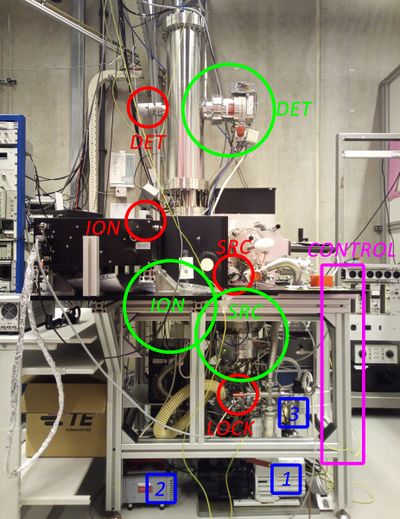
The set-up with all pressure related instruments: Control panel (pink), turbo pumps (green), backing pumps (blue), pressure gauges (red).
- The MaxiGauge shows typical pressures as shown in the figure. Only SRC, ION and DET are of importance for the instrument; their pressure gauges can be turned on by selecting with "sensor" and pressing "sensor on". However, these three gauges cannot handle high pressures, so be sure to keep them off if the pressures are too high.
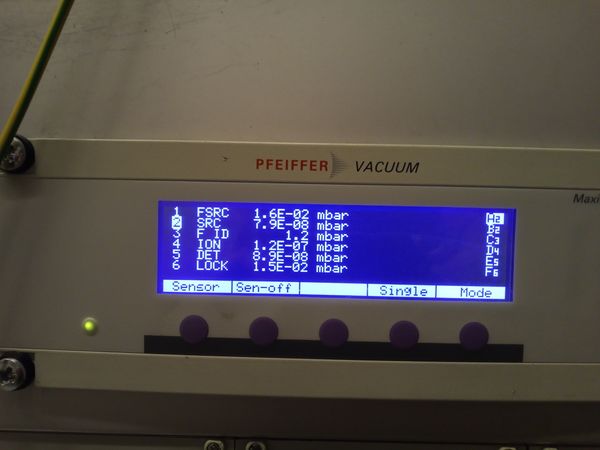
Typical pressures in the set-up. Only 2 SRC, 4 ION and 5 DET are important.


When power comes back
- Check settings on the three control units: 030 (vent mode) should be 0 and 012 (vent enab.) should be on. Scrolling through the menu is done by the arrows, selecting is done by pressing both arrows simultaneously. Choosing the right settings is done again by the arrows, and confirmed again by pressing both arrows simultaneously.

Typical pressures in the set-up.
- Restart the pumps, this can be done using the three control units on the control panel. Press the right button on all three controls (below the lights). The backing pumps 2 and 3 should start automatically first.
- After a few minutes, check the pressure 2 SRC, 4 ION, 5 DET. If after turning on the sensors on the MaxiGauge the pressures are still too high (wait a minute), turn the sensors off again.
- Contact Sjors at +31 6 23848434 or Sander at +31618875389

