

The optical transport system is an optical system designed to project an image of the outcoupling hole of the cavity into the user stations. See here for a list of user stations that are connected.
FEL 1/2 selection
[edit | edit source]See: FEL selection mirror
User station and window selection
[edit | edit source]The operator selects which user station to supply with FELIX light. The optical transport vacuum is separated from the user's experiment by a window. There is a selection box on the wall in each user station to select which window type is fitted. The selection is used as an interlock for the FELIX gun timing, to prevent damaging the window by strong absorption of IR light that is isn't transparant to. Additionally, there is feedback (two LEDs) on the position of the mirror that is inserted into the distribution line to reflect FELIX into the user station. Please note that when the window of a station is IN, that does not necessarily mean that light will reach that station, as another mirror could be inserted upstream. (It usually shouldn't be, but it might).
Operator interface
[edit | edit source]The operator is responsible for the selection of the beam port. For more details see Userstation/Interlock program.
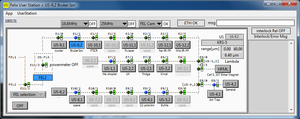
Operator interface

User program
[edit | edit source]Users can check to see which station is selected by:
- Using the user interface program "User station.exe" (LabVIEW 2018 x86 runtime required)*

User interface

- Checking the value of the MQTT topic FELIX/userstation/current on the felixbroker (published by userstationd)
- Calling the Operator
ETH484 devices
[edit | edit source]ETH484-01, ETH484-02, ETH484-06, ETH484-07, ETH484-08, ETH484-09, ETH484-10
beam path lenght
[edit | edit source]Part of the system is measured and drawn into the __FL23 FEL2020 09-05-2022 cad file. A powerpoint overview of the distances between userstation mirrors is found here. File:User stations beam line measurement.pptx
, and for the pdf

