| MQTT daemon | |
 | |
| Publishes digitized FELIX pyro trace and integral to MQTT | |
| Language | Python |
|---|---|
| Hosts | pi7 |
| Repository | pyro on gitlab |
Hardware
[edit | edit source]CPU
[edit | edit source]| pyrod | |
| Location | |
|---|---|
| room | FX-2.35 |
| rack | FF7 |
| Hardware | |
| model | 2B |
| storage | 32 GB |
| Details | |
| os | raspbian |
| Software |
|
| Ethernet device | |
| Location | |
|---|---|
| Room | FX-2.35 |
| IP | |
| DNS name | pi7.fxmnet.science.ru.nl |
| Network | Machine network |
| IP | 192.168.14.138 |
| MAC | b8:27:eb:aa:22:14 |
| Outlet | FX-2.35:135-01-19-10 |
| Switch port | es1-fel-k1-04/3/0/16 |
Pi7 is a Raspberry Pi computer on the machine network in use for digitizing the FELIX pyro (obsolete).
| pyrod | |
| Location | |
|---|---|
| room | FX0.25 |
| rack | FF7 |
| Hardware | |
| model | 4B |
| storage | 32 GB |
| Details | |
| os | raspbian |
| Software |
|
| Ethernet device | |
| Location | |
|---|---|
| Room | FX0.25 |
| IP | |
| DNS name | pi9.fxmnet.science.ru.nl |
| Network | Machine network |
| IP | 192.168.14.159 |
| MAC | dc:a6:32:b3:23:69 |
| Outlet | FX0.25:135-01-19-10 |
| Switch port | es1-fel-k1-04/2/0/29 |
Pi9 is a Raspberry Pi computer on the machine network in use for digitizing the FELICE pyro.
| pyrod | |
| Location | |
|---|---|
| room | FX-2.35 |
| rack | FF7 |
| Hardware | |
| model | 4B |
| storage | 32 GB |
| Details | |
| os | raspbian |
| Software |
|
| Ethernet device | |
| Location | |
|---|---|
| Room | FX-2.35 |
| IP | |
| DNS name | pi11.fxmnet.science.ru.nl |
| Network | Machine network |
| IP | 192.168.14.161 |
| MAC | e4:5f:01:4f:04:e2 |
| Outlet | FX-2.35:135-01-19-10 |
| Switch port | es1-fel-k1-04/3/0/16 |
Pi11 is a Raspberry Pi computer on the machine network in use for digitizing the FELIX pyro.
| pyrod | |
| Location | |
|---|---|
| room | FX-2.35 |
| rack | FF7 |
| Hardware | |
| model | 4B |
| storage | 32 GB |
| Details | |
| os | raspbian |
| Software |
|
| Ethernet device | |
| Location | |
|---|---|
| Room | FX-2.35 |
| IP | |
| DNS name | pi11.fxmnet.science.ru.nl |
| Network | Machine network |
| IP | 192.168.14.162 |
| MAC | e4:5f:01:4f:04:a5 |
| Outlet | FX-2.35:135-01-19-10 |
| Switch port | es1-fel-k1-04/1/0/33 |
Pi12 is a Raspberry Pi computer on the machine network in use for digitizing the FLARE pyro.
Pyrod GPIO outputs pinout Pin Front panel LED Color Description 11 Error Red Daemon off, or no trigger received for 1.5 s 13 Trigger Yellow blinks when triggered 15 Running Green daemon is running 29 Connected Green felixbroker is pingable
Pyrod GPIO inputs pinout Pin Button Color Description 40 Reset Red short press restarts pyrod, holding for 10seconds reboots raspberrypi 38 Boss Black No function yet
Digitizer
[edit | edit source]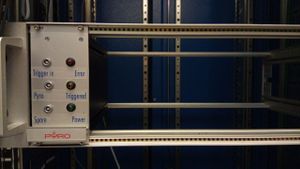
Pyro digitizer hardware in the rack

The digitizer itself is a Bitscope micro board, attached via usb to the pi.
Bitscope micro pinout Pin Front panel connector Connected to L7/ChA Pyro signal ACPS 126 output 12 L6/ChB Spare N.C. L2 Trigger cable M87/8 to Timer A2
Software
[edit | edit source]Pyrod takes the digitized signal of a pyroelectric detector in the diagnostic station and publishes the trace, together with an integral value, to the felixbroker. The FELIX pyro can be restarted using the monit instance on pi7.
MQTT
[edit | edit source]FELIX statusses
[edit | edit source]Topic Description Values FELIX/pyro/shot/json packed dictionary of the parameters of this shot (see items below) json string FELIX/pyro/shot/timestamp timestamp of this shot double (unix timestamp) FELIX/pyro/shot/transient the pyro transient signal string containing comma-separated array of samples, as floats, with units of V FELIX/pyro/shot/max max of the pyro trace float (V) FELIX/pyro/shot/integral the pyro integral float (V * 50 ns) FELIX/pyro/shot/range the max of the measurement range float (V) FELIX/pyro/shot/packed the pyro transient signal LabVIEW packed cluster (timestamp (double), transient (1D array of 8 bit integer), range (double),
note that you have to cast the 64 bit timestamp explicitly to labview 128 bit timestamp)FELIX/pyro/servers/host_pid server declaration json formatted text {"startdate": "date time", "state": "active or passive", "hostname": "hostname", "pid": pid} FELIX/pyro/clients/host_pid client declaration
Note: published by clients, not by this daemonjson formatted text {"hostname": "hostname", "pid": pid,"state":"master or slave","subsystem":"pyro","starttime":timestamp} FELIX/pyro/daemon_time system time of the host the daemon runs on unix timestamp (e.g. 1550680653.91) FELIX/pyro/daemon_time/readable system time of the host the daemon runs on human-readable timestamp (e.g. Wed Feb 20 17:37:59 2019)
FELICE statusses
[edit | edit source]Topic Description Values FELICE/pyro/shot/json packed dictionary of the parameters of this shot (see items below) json string FELICE/pyro/shot/timestamp timestamp of this shot double (unix timestamp) FELICE/pyro/shot/transient the pyro transient signal string containing comma-separated array of samples, as floats, with units of V FELICE/pyro/shot/max max of the pyro trace float (V) FELICE/pyro/shot/integral the pyro integral float (V * 50 ns) FELICE/pyro/shot/range the max of the measurement range float (V) FELICE/pyro/shot/packed the pyro transient signal LabVIEW packed cluster (timestamp (double), transient (1D array of 8 bit integer), range (double),
note that you have to cast the 64 bit timestamp explicitly to labview 128 bit timestamp)FELICE/pyro/servers/host_pid server declaration json formatted text {"startdate": "date time", "state": "active or passive", "hostname": "hostname", "pid": pid} FELICE/pyro/clients/host_pid client declaration
Note: published by clients, not by this daemonjson formatted text {"hostname": "hostname", "pid": pid,"state":"master or slave","subsystem":"pyro","starttime":timestamp} FELICE/pyro/daemon_time system time of the host the daemon runs on unix timestamp (e.g. 1550680653.91) FELICE/pyro/daemon_time/readable system time of the host the daemon runs on human-readable timestamp (e.g. Wed Feb 20 17:37:59 2019)
The pyro trace is represented as a string of 512 floats that are separated by commas. The datapoints are are sampled at 20 MHz (i.e. are spaced 50 ns apart) and are expressed in units of Volts.
-0.030078125,-0.038671875,-0.030078125,-0.055859375,…
Client
[edit | edit source]There is an experimental client GUI that can be found here: S:\Felix\Felix_prg\Operator pyro and spectrum\plotter.exe. It is meant as a tool for the Operator to keep track of the performance of FELIX from his/her desktop.

Installation
[edit | edit source](work in progress)
apt install python-is-python3 python-dev-is-python3 python3-pip
First, make sure you have set up Feloperator gitlab authentication for the git clone and pip install commands below to work.
# clone the pyro code
cd /opt
git clone https://gitlab.science.ru.nl/felix/pyro.git
cd pyro
chgrp -R fft .
chmod -R 2775 .git
mkdir log run
chmod 2775 log run
python3 -m venv .env
.env/bin/pip install -r requirements.txt
dpkg -i prerequisites/bitscope-library_2.0.FE26B_armhf.deb
#python-pip was er misschien al dus die onnodig?
apt-get install -y python-dev python-pip python-lxml
cd prerequisites/python3-bindings-2.0-DC01L
BASECFLAGS="" OPT="" CFLAGS="-O3" ../../.env/bin/python3 setup-bitlib.py install
# deze faalde de eerste keer omdat dat bitlib package er nog niet was
.env/bin/pip install -r requirements.txt
