From HFML-FELIX Wiki
Calendars
[edit | edit source]Several FELIX-related calendars are available from the RU Exchange server.
FELIX General
[edit | edit source]- Events like colloquia, birthdays etc. Accessible (read-only) for every member of FELIX Laboratory, including students.
- FELIX General ICAL link
FELIX Absence
[edit | edit source]- Absence for all staff; you can see if somebody’s out of office. Accessible (read-write) for all staff.
- FELIX Absence ICAL link
FELIX Installations
[edit | edit source]- Planning of repairs, maintenance and upgrades for the technical installation. Accessible (read-only) for all staff, including students. Write access for all technical staff.
- FELIX Installation ICAL link
- Planning for the FX00.07 meeting room. Accessible (read-write) for all staff.
- FELIX FX00.07 ICAL link
Adding calendars to Outlook
[edit | edit source]- Open Outlook
- Navigate to the Calendar section
- In Adress Book search FELIX and add the calenders you are interested in.
- In case you do not see the calendars (e.g. FELIX General) in the list, you can add them via Outlook Web Access (OWA); they should then appear in Outlook as well. Alternatively, you can try to disable the "Use Cached Exchange Mode"-checkbox in File->Account Settings->E-mail->(your account)->Server Settings and restart Outlook. That seems to help in some cases.
Adding calendars to Outlook Web Access
[edit | edit source]- Open Outlook Web Access (OWA)
- Login with your e-mail address and your RU password.
- Navigate to calendar
- Select Share menu and shoose Add Calendar.
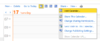
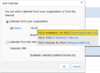
- Type FELIX in the name field, and the calenders should appear as suggestions.


Adding to Google Calendar[1]
[edit | edit source]- On your computer, open Google Calendar.
- On the left, above "My Calendars," click Add Add and then From URL.
- Enter the calendar's address in the field provided. The address needs to be an ICAL link. (use the ICAL links from the sections above)
- Click Add Calendar. The calendar will appear on the left side under "Other calendars."
- Note: It might take up to 12 hours for changes to show in your Google Calendar.
