From HFML-FELIX Wiki
This walkthrough will help you to re-start the intracavity part of the instrument; pumping the source chambers is not necessary.
Venting the machine completely in preparation of a power outage
- switch off all pressure gauges on the Pfeiffer Maxigauge in the 19" rack
- Close the valve between forepump and turbopump of the 35 source chamber (hand valve at the front of the setup, at the far right)
- Close the valve between forepump and turbopumps of the intracavity and differential chambers (all hand valve on the manifold at the back of the setup)
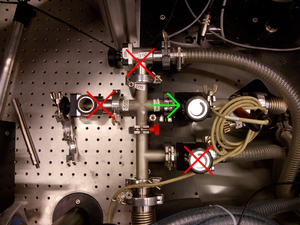
only intracavity valve open
- Vent all turbopumps using the BESTEC PC in the 19" rack
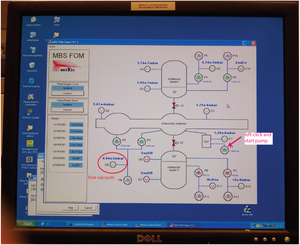
top left
- Once vented


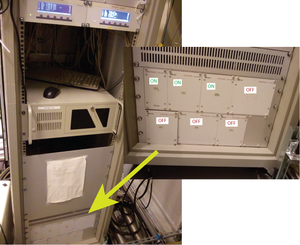
- switch of all power supplies P1-P7 in the bottom of the 19" rack

- shut down the Bestec PC
- switch off Pfeiffer maxigauges
- switch off the mains of the 19" rack

- switch off forepumps (you have to enter in the space under the staircase, close all valves, and flip the power switches)
When power is out (uncontrolled venting)
- In case of a power outage, and the power is still down, switch off the main power of the Bestec 19" rack.
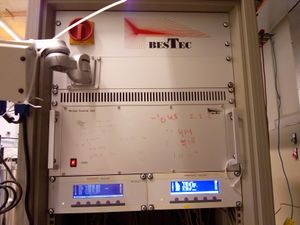
top left - Switch off power supplies P4, P5, P6 and P7 in the bottom of the 19" rack (power switches on the back).
only intracavity valve open - The rotary vane (see next point) should be vented. To do this, the valve in front of the pump ( green one) should be closed and the bellows piping should be disconnected.
When power comes back
- Check the two fore vacuum pumps under the stairs: the scroll pump should start automatically when power comes up, the rotary vane will stay off (keep it that way).
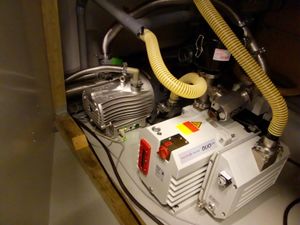
left is the scroll pump
- Ensure that the fore vacuum line is only open toward the intracavity turbo pumps.
only intracavity valve open
- Switch on the main power of the Bestec 19" rack.
top left - The PC should start automatically, and spawn the vacuum control program (shortcut on desktop)
- Ensure pumps P1, P2 and P3 start have started automatically (they should show yellow, indicating a rising pump speed).
- If not: start them by left-clicking either of the pumps and select "start" in the popped-up window; Then close the window.
- (Usually, starting one will also start the other two, but this sometimes fails. To be sure, start each one explicitly).
- (If pump stays red, displaying 0 Hz, communication may have failed. Cycling the power supply frequenly helps).
- If you have not switched off the power supplies (in the "when power is out section"): stop pumps P4, P5, P6 and P7.
top left
- Pressures on G1, G2 and G3 should rapidly drop to 10-5, the foreline pressure is G8, it should be 10-2–0.1 mbar
- Contact Joost at +31 6 4412 6316 or Olga at ...

